

Buying online can feel risky sometimes — “Will I really get my order? What if the seller disappears with my money?” We get it. That’s exactly why ProBooster360 was built differently.
On ProBooster360, your money is protected with escrow, your order status is always visible, and you have full control from chat → order → delivery → payout. This guide will walk you step by step through the buyer’s journey on ProBooster360, so you always shop with confidence.
1. Search & Find What You Need
Use the search bar or category filters to browse vendors, products, or services. Every vendor on ProBooster360 is verified before going live, so you know you’re dealing with real businesses.

2. Chat with the Vendor
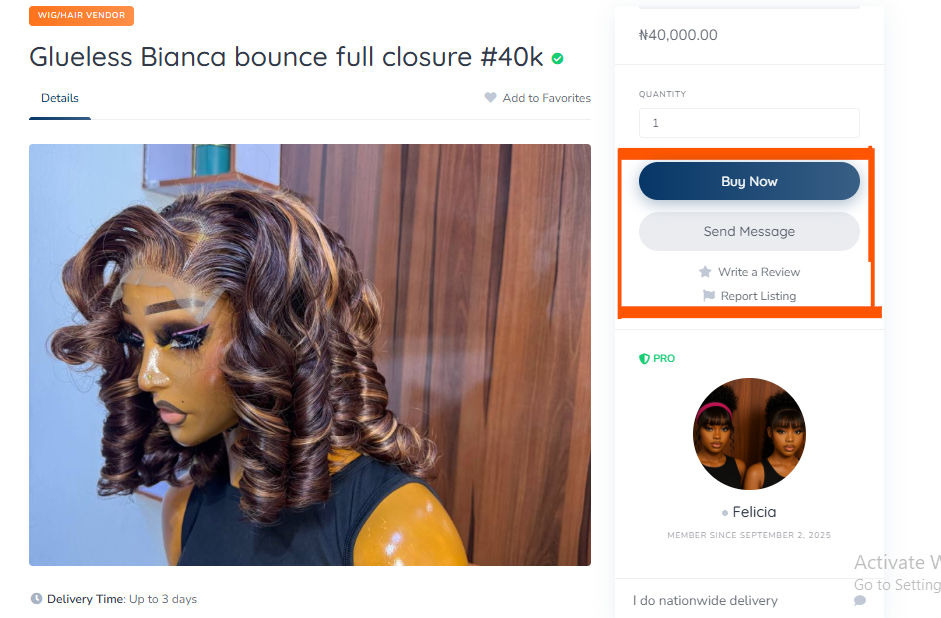
Once you find something you like, click “Send Message”. You can ask questions, confirm details, or discuss customizations before placing your order.

Looking at that purple mark, you would also know when a buyer is online (green color) or offline (grey color). Presently this vendor is offline as it is showing grey. Once you place an order they receive an email about it and also a notification via their dashboard. Sellers don’t usually take time to respond. So be rest assured.
3. Place Your Order Securely
When you’re ready, click “Buyr Now”. You’ll see product details, price, and payment options.
- Card/Automated Payment: Your order status becomes Processing immediately.
- Bank Transfer: Your order shows ON HOLD until ProBooster360 confirms your payment, then it moves to Processing.
💡 Note: Vendors would only start to proceed on your order once the status reads PROCESSING — this protects you and them.

📸 Screenshot 3: Order checkout page.

4. Track Your Order
Once your order is Processing, the vendor begins to fulfill it.
- For quick orders (delivered within 3 days), you’ll get updates inside your order page.
- For longer deliveries (3+ days, e.g., shipping), you’ll receive a tracking number from the vendor or support. Tracking number usually begins with prefix PRO followed by 10digits then ends with suffix -BOOST Enter it on probooster360.com/track to see real-time updates.

5. Delivery & Confirmation
When the vendor delivers, they will mark the order as Delivered with a verified tick or icon.
On your side, it would still read processing but with a notice and a green tick to let you know it has been delivered. Once you’ve received and confirmed everything is okay, you click Confirm Order.
This final step moves the order to Completed and automatically releases your money to the vendor so it is important for you to also click confirm.


6. Refunds & Issues (Your Protection)
If something goes wrong, you can raise a reject order before confirming the order. Or the seller can automatically refund you if they can no longer proceed with the order.
Either ways, ProBooster360 holds the money in escrow until you’re satisfied, so you’ll never lose your funds unfairly.
7. Leave a Review
Once the order is completed, don’t forget to leave a review and rating for the vendor. This helps other buyers trust the right businesses and encourages vendors to serve you better.
📸 Screenshot 8: Review section on vendor profile.
Final Notes (Auto Emails)
Relax — you won’t miss anything! ProBooster360 sends you email notifications every time:
- A vendor replies to your chat.
- Your order status changes (Pending → Processing → Delivered → Completed).
- A refund is issued or anything whatsoever that requires your attention
That way, you’re always in the loop.
Sighs… In Conclusion,
Shopping on ProBooster360 isn’t just convenient — it’s safe, transparent, and built for Nigerians who want peace of mind. From chat to delivery to wallet protection, we’ve got you covered.
👉 Ready to shop smarter? Visit ProBooster360.com today and try it out for yourself.
❓ Frequently Asked Questions (FAQ) About Buying on ProBooster360
Is my money safe when I order on ProBooster360?
Yes! Your money is held in escrow until you confirm the order has been delivered. Vendors only get paid when you’re satisfied.
What happens if the vendor doesn’t deliver?
If your order isn’t delivered as agreed, you can request a refund directly inside your order page. The funds will be returned to you after review.
How do I track my order?
If your order would take more than 3 days, you’ll receive a tracking number. Enter it at probooster360.com/track to monitor the delivery status in real time.
Can I chat with the vendor before ordering?
Yes! Every vendor profile has a Chat Vendor button. Use it to ask questions, confirm product details, or request customizations before placing your order.
How long does it take for vendors to get paid?
Vendors only get paid after you confirm the order is Completed. Once that happens, funds move into their wallet, and they can request payout within 24 hours.
Do I get email notifications?
Absolutely. You’ll receive an auto email anytime a vendor replies, your order status changes, or there’s an update you need to know. Virtually, you receive auto emails for everything.
Can I leave a review after my order?
Yes — and we encourage it! Reviews and ratings help other buyers know which vendors are trustworthy, and they motivate vendors to serve you better.
What payment methods are supported?
You can pay with Card/Automated payment (instant processing) or Bank Transfer (confirmed by ProBooster360 before order starts).
Ready to shop with confidence? Start browsing now or join our WhatsApp community